

Deployments
Deploys that never take your site down
Every deploy builds a fresh release next to the live one and only switches over when every step succeeded. Push to your branch, call a deploy URL from CI or click Deploy now.
How it works
Four steps, and only the last one touches the live site
- 1
Fetch the code
Your branch is cloned into a new release directory named after the date and time. The commit, its author and message are recorded.
- 2
Build the release
The shared
.env(and for Laravel,storage/) is linked in, then your deploy script runs inside the new release as the site's user. - 3
Go live atomically
currentis pointed at the new release in one rename. PHP-FPM reloads so OPcache sees the new files, and queue workers restart. - 4
Keep five releases
Older releases are cleaned up; the newest five stay on the server, so a rollback is instant and needs no build.
Deploy script
A deploy script you can read and change
Every site starts with a deploy script that fits its framework. It is plain Bash, runs with set -e in the new release, and you edit it in the browser.
Use $VIMONTO_PHP and $VIMONTO_COMPOSER instead of php and composer, so the script follows the site's PHP version when you change it. The branch and commit being deployed are available too.
$VIMONTO_COMPOSER install --no-dev --no-interaction --prefer-dist --optimize-autoloader

if [ -f package.json ]; then
    if [ -f package-lock.json ]; then npm ci; else npm install; fi
    npm run build
fi

$VIMONTO_PHP artisan storage:link --force
$VIMONTO_PHP artisan migrate --force
$VIMONTO_PHP artisan optimize
Start a deploy the way that suits you
Push to deploy
Link a repository from GitHub, GitLab (including self-hosted) or Bitbucket and a webhook is added for you. Pushes to the site's branch deploy; other branches are ignored.
A deploy URL for CI
Call a secret URL with
POSTas the last step of your pipeline, so a deploy only starts once your tests pass. Answers are plain JSON.Deploy now
One button in the site header. Follow the phases live, or close the page: the deploy runs on the server and you get a message when it ends.
API and CLI
Start deploys from your own scripts with the REST API, or from CI with the deploy CLI and
Automation--watch, so a failed deploy turns the pipeline red.
Follow every deploy as it happens
A deploy's page shows the phases Fetch, Build and Live, the step that is running and the output of every step. A finished or failed deploy sends a notification, in the app, by email or to your own endpoint.
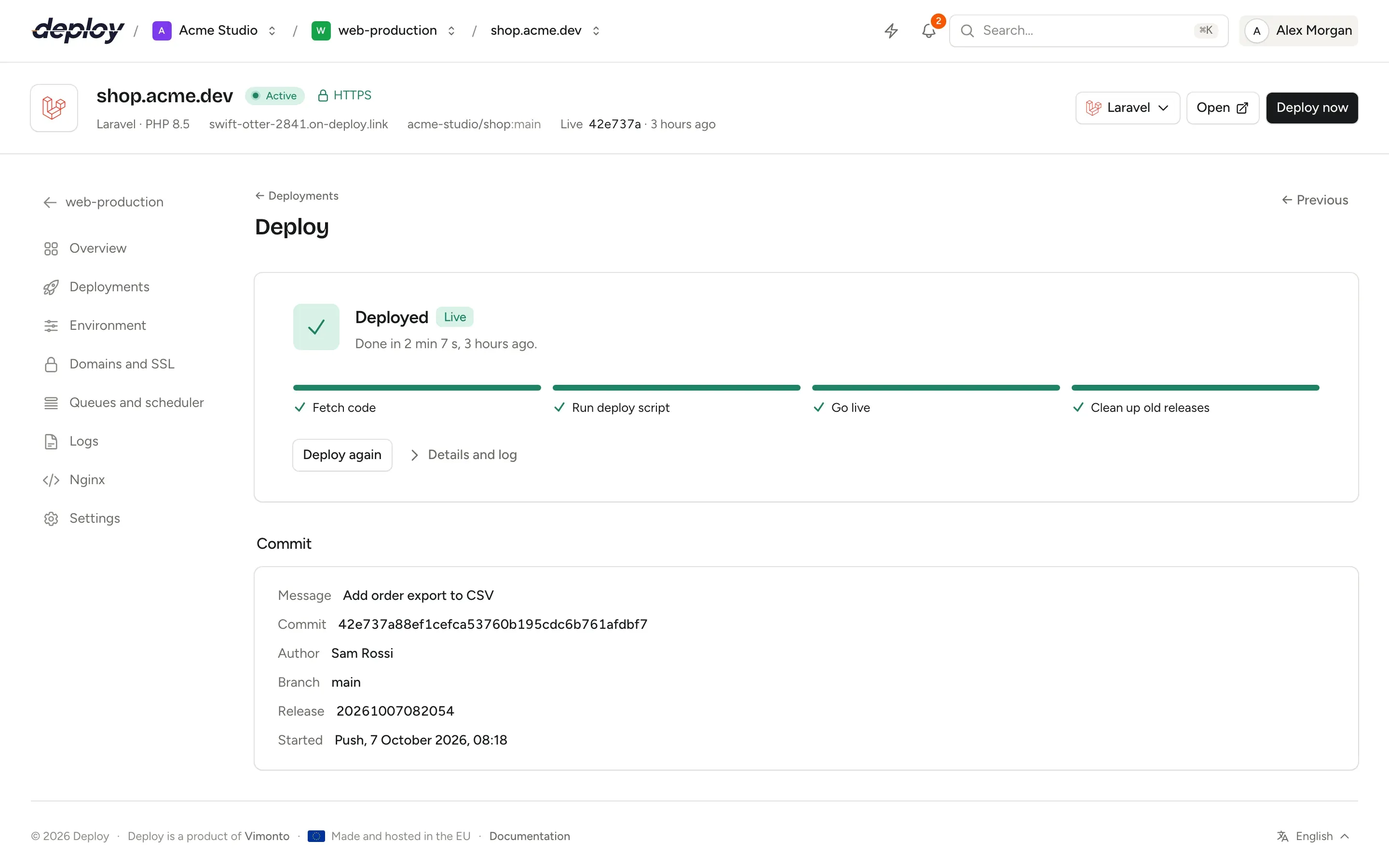
When a deploy fails, nothing changes
If fetching the code or the deploy script fails, the new release is thrown away and current is not touched. Visitors keep getting the version that was live, and the deploy page shows the error with the full log.
Going back is just as quick: choose Roll back on an earlier deploy and that release is live again, without building anything. Database migrations are not rolled back, so undo those yourself when a release needs it.
- Only one deploy runs per site at a time
- The first deploy builds
.envon top of your.env.example - Every
.envchange is kept: restore any of the last 50 - Prefer faster builds? Switch a site to in-place deploys
Safer releases
Staging sites
A copy of a site for another branch, such as develop, on its own address and with its own database. Every push to that branch deploys it.
Security checks
Every deploy audits the new release's Composer and npm dependencies before it goes live. Choose per site whether a known vulnerability warns or stops the deploy.
What went wrong
A failed deploy is explained in plain language from its log, with suggested fixes, most likely first.
Questions about deployments
Do I have to keep the deploy page open?
No. Deploys run on the server as background tasks. Close the page; the person who started the deploy gets a message when it ends, and every deploy is in the activity page and the audit log.
How many releases are kept?
Five: the newest releases, always including the live one. Older ones are removed after each successful deploy.
Which Git hosts can I deploy from?
GitHub, GitLab (including self-hosted GitLab) and Bitbucket, with push to deploy. Any other Git server works through a custom Git URL with the site's deploy key; start those deploys with the deploy URL.
Can I deploy without zero downtime?
Yes. With zero-downtime deploys switched off, each deploy updates one release in place, which keeps vendor/ and node_modules/ and builds faster. You give up rollbacks, and visitors may see the site while it builds.
Related pages
- Sites and domainsSites from framework presets, automatic DNS, free SSL, site features and Nginx you can edit.
- AutomationA REST API, a CLI for CI, deploy URLs, recipes for repeated scripts and deploy hooks.
- LaravelZero-downtime Laravel deploys, with Horizon, Reverb, Pulse, queues and the scheduler a switch away.
Your next deploy could be live before your coffee is.
Create an organization, connect a server and push. That is all.