

Integrations
Connect your accounts once, use them everywhere
One login does everything it can: a cloud token creates servers and manages DNS, a Git connection adds deploy keys and webhooks, a bucket holds your backups. Every token is checked before it is saved and stored encrypted.
All your connections on one page
Settings → Integrations lists your cloud and DNS accounts, Git accounts and backup storage, each with Working or Not working and what its login is used for. Owners and administrators connect accounts; every member sees what is connected.
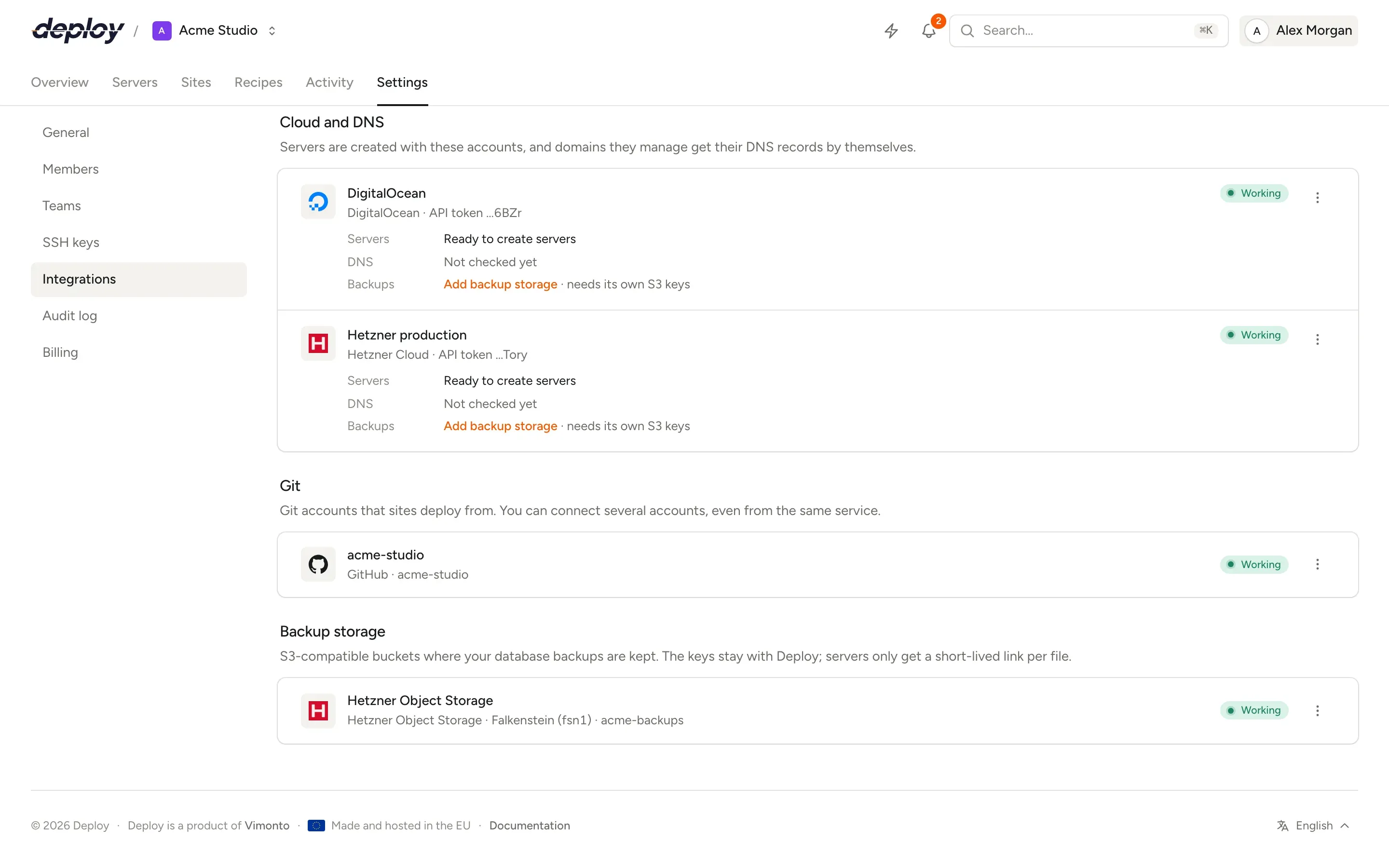
Cloud and DNS
Cloud providers that create servers and point domains
Regions, sizes and prices come live from the provider. Connect several accounts, even at the same provider, such as one project per client.
Hetzner Cloud
Servers in Germany, Finland, the US and Singapore, DNS, and Hetzner Object Storage for backups. Connect with a Read & Write API token.
Hetzner CloudDigitalOcean
Droplets in Amsterdam, Frankfurt, London and worldwide, DNS, and Spaces for backups. API token or OAuth.
DigitalOceanVultr
Cloud compute in many locations, including Amsterdam, and DNS. Connect with an API key.
VultrAkamai (Linode)
Linodes, including in Amsterdam and Frankfurt, private networks through VPCs, and DNS. API token or OAuth.
AkamaiAmazon Web Services
EC2 instances in every AWS region with a fixed Elastic IP, Route 53 for DNS, and Amazon S3 for backups. Connect with an IAM access key.
Amazon Web ServicesGoogle Cloud
Compute Engine VMs in every Google Cloud region with a static address, and Cloud DNS. Connect with a service account key.
Google CloudCloudflare
DNS only, plus R2 for backups. Records are created DNS only, not proxied, so certificates and visitor addresses work.
Any other provider
Connect any Ubuntu 24.04 or 26.04 server with one command as a custom VPS. No provider account needed.
Servers
DNS records that set themselves
When you connect a cloud or DNS account, Vimonto Deploy fetches the domains it manages. Add one of those domains to a site and it shows the records it will create or change, then sets them and requests a Let's Encrypt certificate once they resolve.
Your domains at Cloudflare and your servers at Hetzner? Connect both: each login is used for what it manages. Records Vimonto Deploy made are remembered, and only those are removed when you delete a domain or a site.
Git
GitHub, GitLab and Bitbucket
Pick a repository and branch from a list when you create a site. The repository is then set up for you.
Read-only deploy keys
Each site gets its own SSH key, added to the repository as a read-only deploy key: servers can clone and pull, never push.
Push webhooks
A webhook posts every push to the site, so pushes to its branch deploy. Turn it off and the webhook is removed again.
Self-hosted GitLab
Connect your own GitLab over HTTPS with a personal access token with the
apiscope.Tokens that refresh
Short-lived access tokens are refreshed by themselves before a request needs them. Old deploy keys and webhooks are cleaned up when you switch repositories.
Backup storage
S3-compatible storage for database backups
Add a bucket once and choose it per backup schedule. The keys stay with Vimonto Deploy: servers only get a short-lived link for one file.
Amazon S3
17 regions, from Frankfurt, Zurich and Stockholm to Virginia, Tokyo and São Paulo.
European object storage
Hetzner Object Storage, Scaleway Object Storage, OVHcloud Object Storage and DigitalOcean Spaces in European regions.
Cloudflare R2
Enter your Cloudflare account ID and an R2 token with object read and write for the bucket.
Any S3 endpoint
MinIO, Backblaze B2 or any storage that speaks the S3 API, with path-style buckets on by default.
Migration
Move over from another control panel
Already manage servers with another server management platform? Paste an API token from that platform and Vimonto Deploy reads your servers and their sites. Pick the servers to take over: each one is taken over in place, nothing is reinstalled, and your domains keep pointing at the same servers, so visitors notice nothing.
Vimonto Deploy gets its key onto the server through the old platform, then moves processes, cron jobs and sites over one by one, in the release layout for zero-downtime deploys. The old platform's Nginx files, Supervisor programs and cron jobs are moved to /root/vimonto-takeover-backup, not deleted. The token is only used to read your servers and run one access script.
Questions about integrations
Do I need a DNS integration?
No. Without one, you create an A record at your DNS provider yourself; the domain's Set up dialog lists the records. An integration only saves that step and requests HTTPS for you.
Do I need a Git connection to deploy?
No. Any repository works through a custom Git URL with the site's own deploy key, which you add to the repository yourself. Start those deploys with the deploy URL or the CLI.
Can Vimonto Deploy push to my repository?
No. Deploy keys are added read-only, so servers can clone and pull but never push.
Do my servers get my storage keys?
No. Keys stay in Vimonto Deploy, stored encrypted. For each upload or download, the server gets a link that works for one file and one action, and expires.
What happens when I disconnect a cloud account?
No new servers can be created on it and its domains get no more DNS records. Existing servers keep working, because all further work goes over SSH; they keep running at the provider until you delete them there.
Related pages
- Cloud providersCreate servers at Hetzner, DigitalOcean, Vultr, Akamai, AWS or Google Cloud, or connect any Ubuntu VPS.
- DeploymentsZero-downtime releases, push to deploy, deploy URLs for CI and one-click rollbacks.
- Databases and backupsMySQL, MariaDB or PostgreSQL, database users and scheduled backups to your own bucket.
Your next deploy could be live before your coffee is.
Create an organization, connect a server and push. That is all.