

Sites and domains
Domains that point themselves, certificates that renew themselves
Create a site from a framework preset and it is live on a free on-deploy.link address with HTTPS within minutes. Add your own domain when you are ready: with a connected DNS account, the records and the certificate follow by themselves.
Frameworks
Start from a preset that knows your framework
Each preset sets the runtime, the web directory, the build command and a deploy script that fits. Change any of it under **Advanced settings**.
Laravel and Statamic
PHP-FPM behind Nginx, a shared
Laravel hostingstorage/, a production.envwith the database filled in, queue workers and the scheduler.Symfony and plain PHP
Any PHP app with an
PHP hostingindex.php, with Composer packages installed on every deploy.WordPress and phpMyAdmin
No repository needed: the latest release is downloaded and configured, with a database and fresh security keys.
WordPress hostingNext.js and Nuxt
Your app runs as a process on a free local port from 3000 up, and Nginx proxies to it with WebSocket support.
Next.js hostingStatic sites
HTML, or a frontend built into files with Vite or Astro. Pick npm, yarn, pnpm or bun for the build.
Monorepos
Point the site's root directory at a folder such as
/backend; the deploy script,.envand web directory follow it.
Create a site
What happens after you click Create site
- 1
Set up
The DNS record for the generated address, the database and its own user, the site's directories, the
.envand the Nginx configuration are created. - 2
Link
With a GitHub, GitLab or Bitbucket repository, a read-only deploy key and a push webhook are added for you.
- 3
Deploy
The first deploy clones your branch, runs the deploy script and makes the release live.
- 4
HTTPS
Once the name resolves to the server, a free Let's Encrypt certificate is requested and the site switches to HTTPS.
Domains and DNS
Your domain, pointed for you
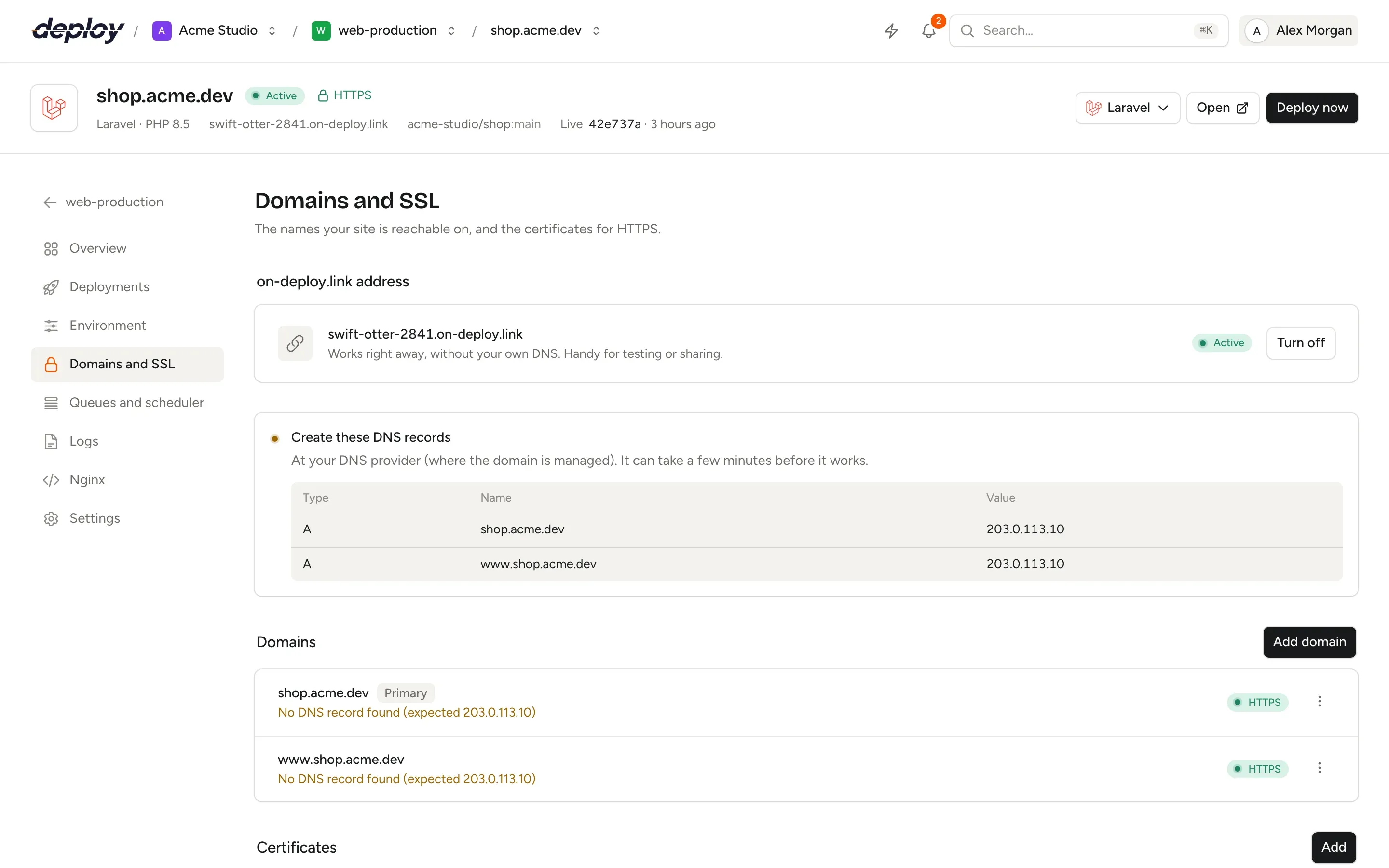
Every site can get a free address such as kalme-rivier-4821.on-deploy.link. It works right away, without DNS of your own, so you can test and share a site before it goes live.
When you add your own domain, Vimonto Deploy looks it up live at your connected Hetzner Cloud, DigitalOcean, Vultr, Akamai, AWS (Route 53), Google Cloud DNS and Cloudflare accounts. If one of them manages the zone, it shows the records it will make: an A record for the domain, a CNAME for www. and an A record for *. with wildcards. Each is marked New, Already right or Changes, and nothing that exists changes until you tick Change these records.
Not at any of your accounts yet? Add the zone to one of them from the same dialog; the nameservers to set at your registrar are in the task output. Records Vimonto Deploy made are remembered, and only those are removed when you delete the domain or the site.
- Any number of aliases per site, each with its own options
- Permanent redirects from or to
www., keeping path and query - Wildcard subdomains served by Nginx
- At Cloudflare, records are created DNS only, so HTTPS works
Every domain with its DNS and HTTPS status
The Domains and SSL page shows the generated address, the records to create when you manage DNS yourself, whether each domain points to this server, and which names are on the active certificate.
Free HTTPS that renews itself
Let's Encrypt certificates are requested with the webroot challenge, so nothing has to stop and password protection does not get in the way. Once issued, Nginx serves HTTP/2 over TLS 1.2 and 1.3 with an HSTS header and redirects http:// to https://. certbot renews the certificate before it expires and reloads Nginx.
Bought a certificate? Paste it with its private key, create a certificate signing request for your certificate authority, or reuse an uploaded certificate from another site, such as a shared wildcard. A site holds several certificates and serves exactly one, so switching is one click.
Site features
The tools your framework uses, one switch each
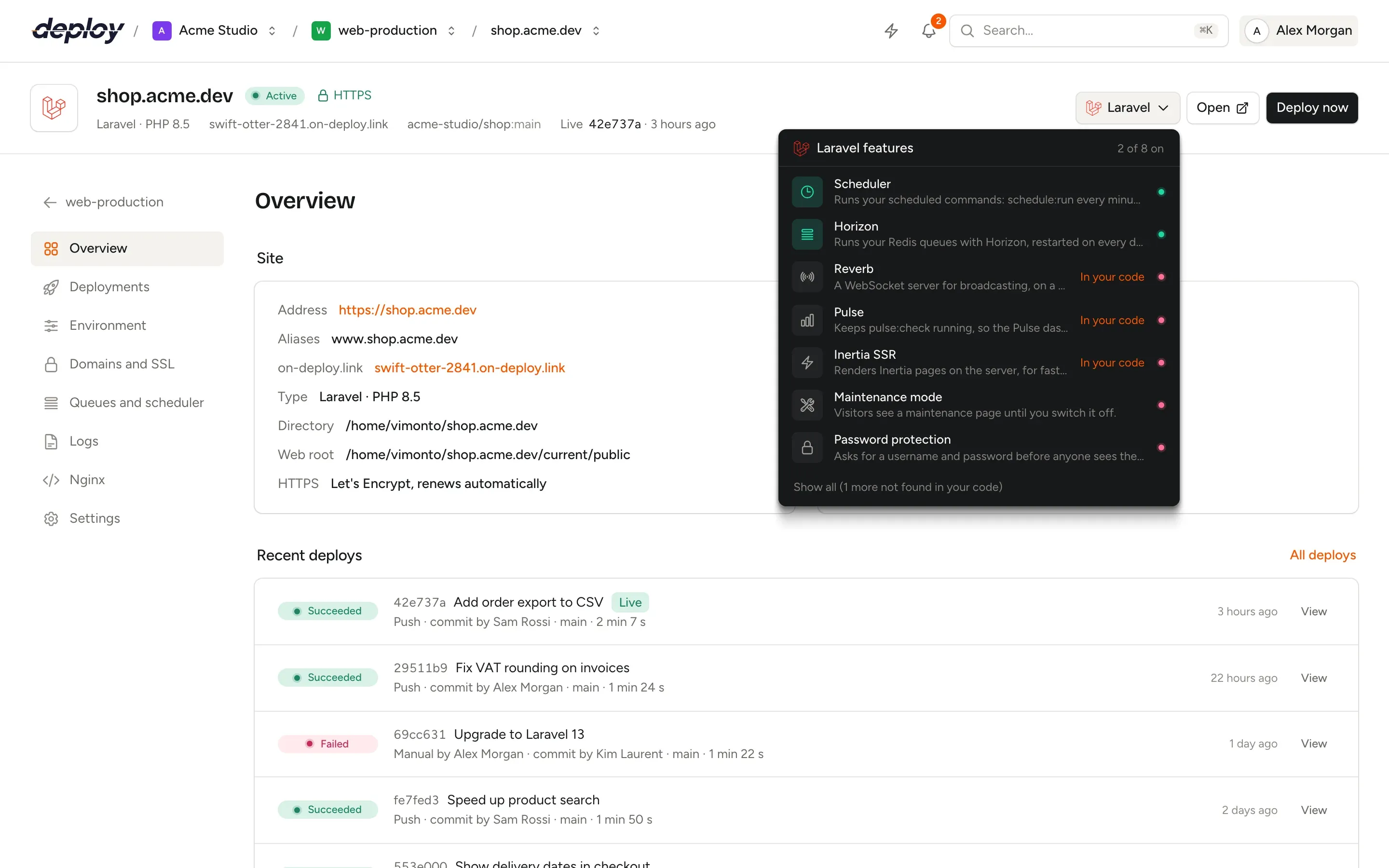
A site feature writes the Supervisor process, cron entry, Nginx directives and `.env` keys a tool needs, shows them before you switch it on, and restarts it after every deploy. Features whose package is in your `composer.json` or `package.json` are listed first.
Horizon and the scheduler
artisan horizonunder Supervisor withhorizon:terminateafter each deploy, andschedule:runevery minute in the live release.Reverb
A WebSocket address such as
ws.shop.example.com, with its Nginx rules, DNS record, certificate andREVERB_*keys in.env.Pulse, Nightwatch and Inertia SSR
The Pulse checker, the Nightwatch agent and the Inertia SSR server kept running and restarted on each deploy.
Symfony Messenger
messenger:consumefor your transports, 1 to 20 workers, stopped cleanly after each deploy.WordPress
Real cron through WP-CLI, the Redis object cache plugin, and hardening that blocks
xmlrpc.phpand PHP in uploads.Maintenance and password protection
Maintenance mode with a bypass link, and HTTP basic authentication for staging sites and previews.
Switch tools on from the site header
Nginx you can read, extend and edit safely
Each site has its own generated Nginx configuration, kept up to date when domains, certificates or settings change. For headers or simple redirects, drop a .conf file in the site's include folder, such as /etc/nginx/vimonto-conf/site-12/: it is loaded inside the site's server block and kept on every rewrite.
Prefer to edit the whole file? The Nginx page tests every change with nginx -t before reloading. If Nginx rejects it, the previous configuration goes back and keeps running, so a typo never takes the server's other sites down.
- Redirects with 301, 302, 307 or 308, up to 100 per site
- Security rules: basic authentication for a path such as
/admin, up to 10 users per rule - Logs: Laravel, Nginx and PHP-FPM logs with search, filters and live follow
- Commands: run
php artisan migrate --forceonce, with a history of output
Load balancing
Spread one domain over several app servers
Put a load balancer server in front of two or more app or web servers that run the same site. Choose Round robin, Least connections or IP hash, give each server a weight from 1 to 100, and mark servers as backups that only take traffic when the others are down.
Traffic goes over the private network when the servers share one. A server that fails 3 times within 10 seconds gets no traffic for 10 seconds, and failed requests are retried on the next server. The app servers trust the balancer, and only it, for the visitor's IP address and HTTPS, so your framework needs no proxy settings.
Isolation and environment
Keep sites apart and settings safe
Website isolation
Give a site its own Linux user, a home directory other sites cannot read and, for PHP, its own PHP-FPM pool. Chosen when you create the site.
Encrypted .env
Stored encrypted and written to
shared/.env, shared by every release. Values stay masked until you click Reveal, which is audited.Environment history
Every saved
.envbecomes a version with the keys that changed. Restore any of the last 50 in one click.Clone a site
Copy a site with its repository, build settings, deploy script and rules to the same or another server, for staging or a move.
Questions about sites and domains
Do I need a domain to create a site?
No. Every site can get a free on-deploy.link address that works right away, with HTTPS. Add your own domain when you are ready; the generated address can be switched off once the site has one.
Can Vimonto Deploy create my DNS records?
Yes, when the domain is managed by a connected Hetzner Cloud, DigitalOcean, Vultr, Akamai, AWS, Google Cloud or Cloudflare account. It shows exactly what changes, then requests HTTPS once the records resolve. Domains elsewhere you point with an A record yourself. See integrations.
Are SSL certificates free?
Yes. Let's Encrypt certificates are free, renew automatically and cost nothing extra in Vimonto Deploy. Wildcard names need a certificate you upload, because Let's Encrypt only issues those with a DNS challenge.
Can I host several sites on one server?
Yes, as many as the server has room for. Each site has its own Nginx configuration and directory, and with isolation its own Linux user and PHP-FPM pool.
Can I change the framework of a site later?
No, the preset is chosen at creation. The PHP version, web directory, Node.js port and zero-downtime deploys can be changed in the site settings, and the deploy script on the Deployments page.
Related pages
- DeploymentsZero-downtime releases, push to deploy, deploy URLs for CI and one-click rollbacks.
- IntegrationsCloud and DNS providers, Git hosts and S3-compatible storage, connected once per organization.
- LaravelZero-downtime Laravel deploys, with Horizon, Reverb, Pulse, queues and the scheduler a switch away.
Your next deploy could be live before your coffee is.
Create an organization, connect a server and push. That is all.